The station itself was built and shaken down already. This post is about everything around it: choosing a second identity for portable operating, wiring it correctly through QRZ.com, LoTW, Club Log and QRZCQ, and setting up the logging chain so a field QSO lands in the right place without a second thought.
Continuing from the first QRP portable test setup, where the station itself got built and powered up for the first time. This post is about everything that happens before the first CQ: the callsign, the accounts, and the logging chain behind it.
For the last while, most of my radio energy has gone into the shack: sorting out the antenna, chasing down noise, getting the logging chain between Log4OM, QRZ.com, Club Log and LoTW to run cleanly. That part is done now, and it left me with an itch I hadn’t expected, I wanted to take a station outside.
Two things pulled me in that direction at the same time. With my family, we go every summer to our holiday house in Roy, near Marche-en-Famenne, in the Belgian Ardennes, an obvious place to operate from on quiet afternoons. And somewhere on Facebook I kept running into activation reports from the WWFF (Worldwide Flora & Fauna) programme: people setting up in forests and nature reserves, working dozens of contacts, and posting neat little QSO maps afterwards. I had no idea how any of it worked. This post is the story of figuring that out, from a complete standing start.
The station: small on purpose
I didn’t want a scaled-down version of the shack. I wanted something built for the constraint of a backpack:
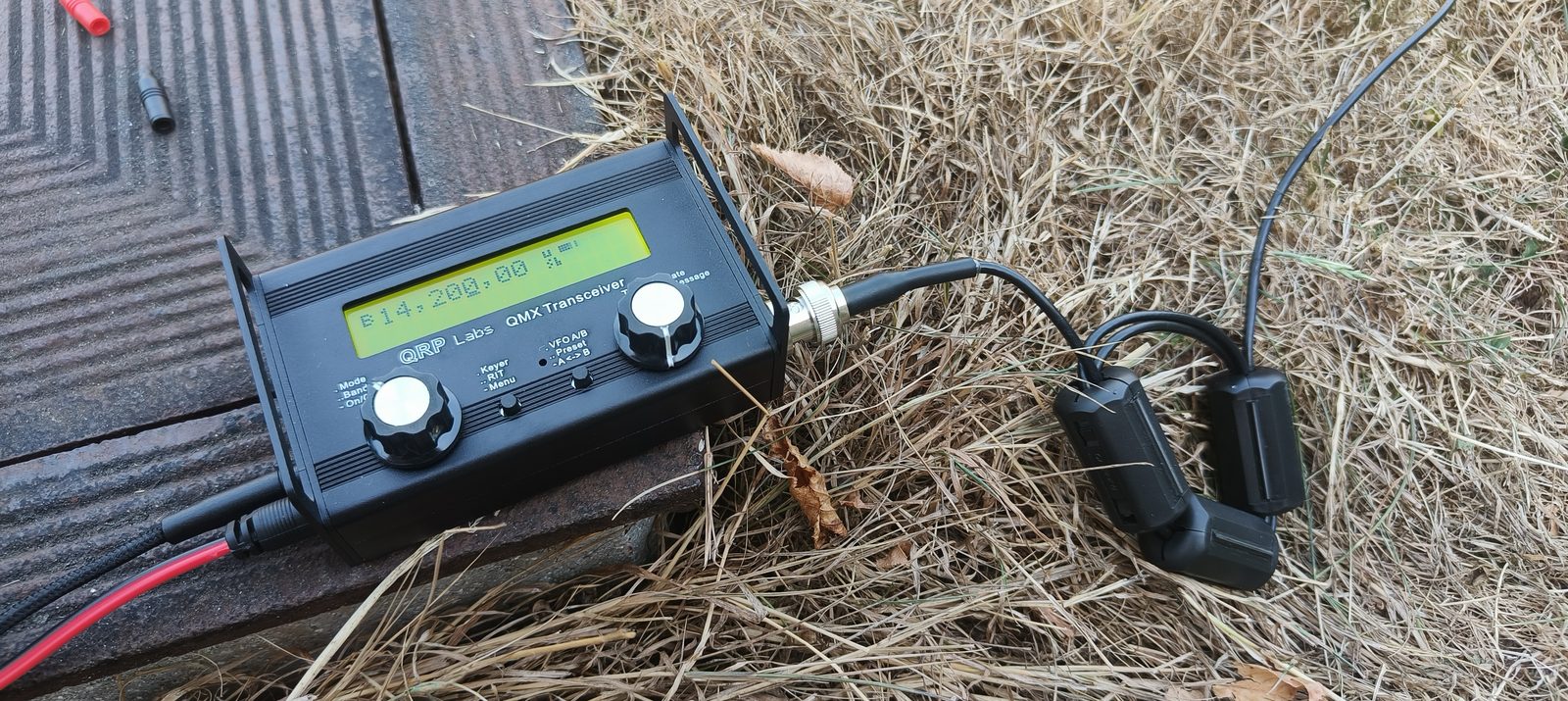
- QRP Labs QMX, 5 W, covering 60/40/30/20/17/15 m, CW, digital and SSB in one small radio with a single USB-C connection for both CAT and audio.
- SOTAbeams Band Hopper IV linked dipole, run as an inverted V on a 10 m mast. I already owned the IV (20/30/40/80 m); the 80 m section stays coiled on its winder since the QMX doesn’t cover that band and an 80 m dipole needs more clear span than most forest clearings offer. Effectively I run it as a III: 40/30/20 m, full size, no ATU, no loading coils, every milliwatt of those 5 watts goes into the air, not into a matching network.
- A G7UFO Turret mini microphone for SSB.
- Logging on the same laptop that runs my shack station, plus an iPad and phone for sessions where the laptop stays home.
5 watts is not a limit imposed by my licence, it’s the radio. That single fact shaped almost every decision downstream: which mode to start with, how the antenna gets built, and how I present myself on the air.
Why /P, and not /QRP
My first instinct was to operate as ON3VZ/QRP, it felt descriptive. It turns out that’s the wrong call for this. ONFF’s activator ranking requires a station to sign /p or /m; /QRP isn’t a recognised suffix and wouldn’t count toward that ranking, on top of which every additional variant call multiplies the administration, a separate QRZ logbook, a separate LoTW certificate, a separate entry in Club Log.
So I operate as ON3VZ/P, and I make the QRP status visible another
way: TX_PWR = 5 in every logged QSO (which is also what triggers WWFF’s
QRP exception to the 44-QSO minimum), a 5W QRP note in my spot comments,
and it’s stated plainly on my QRZ.com page.
Getting the accounts right
A portable call isn’t just a label, on most of these platforms it’s a second identity that needs its own setup, and getting the relationship between the two calls wrong is the easiest way to end up with QSOs stuck in the wrong place.
QRZ.com treats any call with an added prefix or suffix as a distinct call with its own logbook, but it’s all the same account throughout, no second login. I added ON3VZ/P as a secondary callsign to get it its own bio page, then created a separate logbook tied to that callsign with a non-overlapping validity date, and generated a dedicated API key, with “Force Station Callsign” set to ON3VZ/P as a safety net against anything ever slipping through with the wrong call.
LoTW works differently: one certificate per call, but they can share a single LoTW account. In TQSL, requesting a new certificate for ON3VZ/P means answering “what is this for?”. The correct answer is None of these apply (not “replaces my existing callsign”, which would retire ON3VZ). Because the request is signed with my existing ON3VZ certificate, it skips the manual paperwork entirely and typically clears in a few days.
Club Log flips the QRZ logic: one account, multiple calls added under it, optionally linked together for combined DXCC credit, never a second account.
QRZCQ.com got the same treatment as QRZ: an alias callsign, its own
profile text, 5W QRP in the short comment field so it travels with
lookups.
I built the ON3VZ/P QRZ.com bio page as its own thing rather than a copy of my home page, dark green, flora-and-fauna palette, the field station photo as the header image, the 5 W QRP badge as the one warm accent on the page. It’s meant to look, at a glance, like a different kind of station than the shack.

One master log, two configurations
The temptation with a second call is to think you need a second logbook. You don’t, and you don’t want one. Log4OM holds a single database with my entire operating history in one place, and I run two configurations against it: the shack configuration (ON3VZ, IC-7300, home grid) and a portable one (ON3VZ/P, QMX, whichever grid I’m operating from that day).
Switching configuration switches everything that matters: station call,
operator call, gridsquare, default TX power (5 W), the QRZ API key it
uploads to, and which LoTW/TQSL Station Location it signs with. WWFF’s
MY_SIG / MY_SIG_INFO fields stay empty for ordinary portable operating
and only get filled in as WWFF / ONFF-xxxx for an actual activation.
The one habit this setup demands, without exception: check the title bar before you touch the key. Forgetting to switch configuration is the single easiest way to send a portable QSO into the wrong logbook, under the wrong call, signed by the wrong certificate.
The full breakdown of each platform’s setup, and the horizontal version of this diagram with every field explained, is in the technical manual, linked again at the bottom of this post.
WSJT-X, and a myth about /P in FT8
I’d assumed a compound call like ON3VZ/P would drop out of FT8’s grid
field entirely, that turned out to be wrong. ON3VZ/P is a type-2
compound callsign, and WSJT-X’s “Full call in Tx3” message generation
handles it as such: my CQ actually reads CQ ON3VZ/P JO20, grid and all.
What FT8 genuinely can’t do is carry 5W QRP inside the exchange. A
message is 77 bits, already spent on callsigns and a grid. That
information travels a different way: through the spot, not the signal.
The portable WSJT-X configuration mirrors Log4OM: My Call ON3VZ/P, grid set per location, the QMX selected as rig, UDP forwarding into Log4OM so a field QSO lands straight in the master log without a manual import step. A separate configuration also means the Reporting tab needed a second look, automatic logging in WSJT-X only fires with “Contesting only” switched off, which is worth checking on the home configuration too.
PoLo for the SSB sessions
For the sessions where the laptop stays home, I use PoLo (Ham2K Portable Logger) on an iPad and phone: operator/station call set the same way as everywhere else, 5 W as the default power, offline data files refreshed at home over wifi (there’s no signal in most of these forests to fetch them later), and the built-in “Hams of Note” file for recognising other activators and volunteers on sight.
PoLo has no live link to Log4OM the way WSJT-X does. It exports ADIF, and that file gets imported by hand afterwards. Multi-device sync between phone and iPad exists (Ham2K Log Filer / “LoFi”) but only for QSO data, not settings, and it’s young enough that I don’t fully trust it yet for a first activation; a manual ADIF export remains the dependable path.
Spotting: the part that actually gets you worked
At 5 watts, nobody stumbles across you tuning across the band. Being found is the strategy, and that happens through spotting, not through signal strength.
WWFF runs its own service, Spotline (spots.wwff.co), released in
2025, log in with your callsign, post frequency, mode, and a comment
carrying the reference and 5W QRP. Registering the activation on the
WWFF agenda beforehand means Spotline can auto-populate spots during the
scheduled window, and once I’m operating CW, the Reverse Beacon Network
will spot me automatically without me touching a keyboard. There’s also
a smartWWFF app for phone and tablet, and PoLo can spot directly to
Spotline and POTA. One rule worth knowing: a spot counts as a duplicate
at the same frequency (±1 kHz), same call and reference, within 10
minutes of the last one, re-clicking out of nerves does nothing.
The gotcha that would have bitten me later
Here’s the one mistake I’m glad I caught before it happened rather than after: Log4OM’s LoTW/TQSL link points at one fixed Station Location per configuration, for me, “Roy vakantiehuis JO20qe”. It doesn’t read the grid out of each QSO and pick the right location automatically.
What’s next
The KMZ file with all official ONFF reference boundaries is going onto my phone and iPad, so I can confirm I’m actually inside a reference before I ever key up. First real target: ONFF-0599, Carrière de l’Alouette. And CW is the next mode to bring into the mix, between the Reverse Beacon Network’s automatic spotting and roughly two S-points of QRP advantage over SSB, it’s the natural next step for a 5-watt station.
Everything from this build is linked below: the full technical manual, in English, and a printable field checklist in both English and Dutch.
The manual is the complete step-by-step reference behind this build: QRZ, LoTW, Club Log, QRZCQ, Log4OM, WSJT-X and PoLo, spelled out platform by platform. The checklist is the condensed, printable version to fold into the antenna bag.
There is something appealing about the fact that a licence, a 5-watt radio and a wire in a tree can get you into a hobby with this many moving parts, and that all of them turned out to be figure-out-able. More once the log has an activation in it.
73 and 44 de ON3VZ/P